Plug drawings follow the site convention: contacts facing you, latch at the back, pins on the left, cable to the right, pin 1 at the bottom.
Note: Solis uses different pins in different series. Three-phase S6-EH3P units carry RS485 on pins 1/2, single-phase S6-EH1P units on pins 4/5. Check the exact model on the rating plate before you crimp the cable.
In every case use the port labelled RS485 (“third-party external devices”). Meter serves the energy meter, BMS the battery and PAR-A/PAR-B parallel operation: do not connect the dongle there.
S6-EH3P: three-phase hybrids 8–20 kW
Covers e.g. S6-EH3P12K/15K/20K-ND-H, S6-EH3P8K/10K/12K-LV-ND-H and the older S6-EH3P(12-20)K-H.
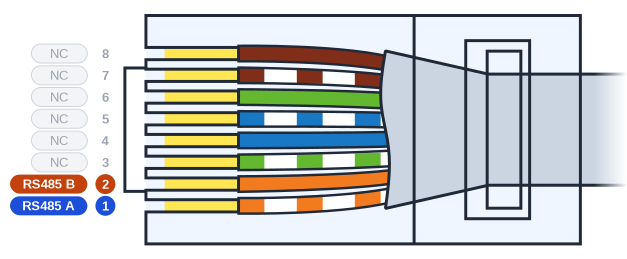
| Pin | Signal (Solis) | Dongle terminal | T568B colour |
|---|---|---|---|
| 1 | RS485A | A | white-orange |
| 2 | RS485B | B | orange |
| 3–8 | – | – |
The manual lists no GND pin on this port.
✅ Confirmed in the Solis manuals S6 Series Hybrid Inverter, three phase (V1.2, 07.2025, section 4.8.6) and S6-EH3P(12-20)K-H (section 4.8.6).
S6-EH1P: single-phase hybrids
Covers e.g. S6-EH1P(3-8)K-L-PRO and S6-EH1P(3-6)K-L-AU. Solar Assistant gives the same layout for the S6-EH1P6K-L-PLUS.
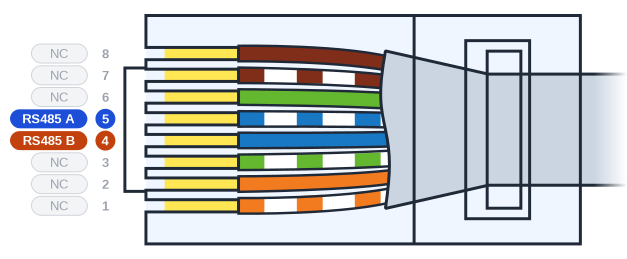
| Pin | Signal (Solis) | Dongle terminal | T568B colour |
|---|---|---|---|
| 4 | RS485B | B | blue |
| 5 | RS485A | A | white-blue |
| 1–3, 6–8 | – | – |
✅ Confirmed in the Solis manuals S6-EH1P(3-8)K-L-PRO (V1.1, 03.2024, section 3.10.6) and S6-EH1P(3-6)K-L-AU (V1.1, 11.2024, section 4.7.6). L-PLUS: 🟡 Solar Assistant only.
Other Solis series
| Series | Port | A | B | Status |
|---|---|---|---|---|
| S6-EH3P30K/50K-H | RS485 (RJ45) | 5 | 4 | 🟡 Solar Assistant |
| S6-EH3P 60–125K (Solarator) | RS485 (RJ45) | 5 | 4 | 🟡 Solar Assistant |
| RHI-3P5K-HVES-5G-DC | RS485 (RJ45) | 5 | 4 | 🟡 Solar Assistant |
| S5-EH1P(5-6)K-L | COM (Wi-Fi logger port, not RJ45) | 2 | 3 | 🟡 Solar Assistant |
On the S5-EH1P-L this is the port the Wi-Fi logger reads from: the dongle and the logger cannot run at the same time. Pin 1 of that port carries +5 V: do not connect it to the dongle.
How Solis draws the connector
Solis shows the socket from the front, latch slot at the bottom, pins 1…8 from the left, with T568B colours. That matches the view into the inverter’s port. The colours assume a T568B cable: in a T568A cable the orange and green pairs are swapped, so count pins.
Sources
- Solis, User Manual for S6 Series Hybrid Inverter, three phase (S6-EH3P…-ND-H), V1.2 07.2025: PDF
- Solis, S6-EH3P(12-20)K-H User Manual: PDF
- Solis, User Manual for S6 Series Hybrid Inverter S6-EH1P(3-8)K-L-PRO, V1.1 03.2024: PDF (upwatt.com)
- Solis, User Manual for S6 Series Hybrid Inverter S6-EH1P(3-6)K-L-AU, V1.1 11.2024: PDF
- Solar Assistant: Solis model list, S6 Hybrid RS485, S5-EH1P-L RS485